

TM 5-2350-378-23&P
0015
HYDRAULIC OIL OVERHEATS - Continued
STEP
1.
Perform Hydraulic Diagnostic Center (HDC) manual valve status check. Ensure that manually-operated HDC
valves V21, V22, and V23 are open.
a.
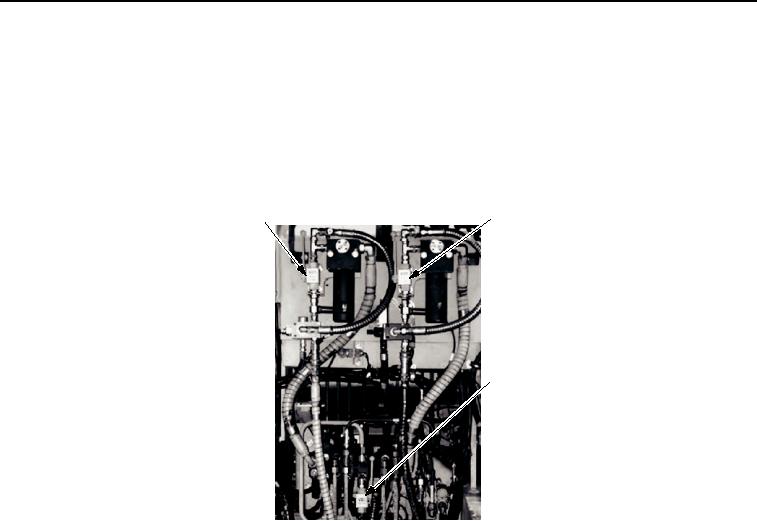
Check status of manually-operated valves V21 (Figure 1, Item 1), V22 (Figure 1, Item 2), and V23
(Figure 1, Item 3).
2
1
3
T01304HDC
Figure 1. Directional Control Valve (DCV) Bank.
b.
Ensure these manually-operated valves are completely open.
CONDITION/INDICATION
Are all manual valves open?
DECISION
YES - Go to Step (2).
NO - Open valves.
STEP
2.
Perform HDC solenoid valve V19 test.
a.
Reset all HDC solenoid valves by selecting RESET VALVES button (Figure 2, Item 5) on HDC control
box.
b.
Start engine and have assistant move SPRUNG/UNSPRUNG lever to SPRUNG mode.
c.
Using LINE UP or LINE DOWN button (Figure 2, Item 3), select V5 on HDC display (Figure 2, Item 2).
d.
Close V5 on HDC display (Figure 2, Item 2) by selecting CHANGE POSITION button (Figure 2, Item 4)
on HDC control box.
e.
Have assistant move SPRUNG/UNSPRUNG lever to UNSPRUNG mode.
f.
Read transducer T-1 hydraulic pressure on HDC display (Figure 2, Item 1).